Скачать openMIXDownload openMIX
Версия 1.0.39 для Mac на Apple Silicon и для Windows 10/11 x64. При первом запуске программа попросит ключ. Его можно взять бесплатно, на 60 дней.Version 1.0.39 for Apple Silicon Macs and for Windows 10/11 x64. On first launch the app asks for a key. Take one free, for 60 days.

openMIX 1.0.39
Mac на Apple Silicon с macOS 26 Tahoe или новее; Windows 10 или 11, 64 бит. Размер, SHA‑256 и ZIP без установки для Windows — под значком ⓘ у кнопки.Apple Silicon Macs with macOS 26 Tahoe or later; Windows 10 or 11, 64-bit. Size, SHA-256 and the portable Windows ZIP are under the ⓘ beside each button.
Zoom Plugin for openMIX 1.0.2Zoom Plugin for openMIX 1.0.2
Для Zoom-входов: openMIX подключается к встрече Zoom, каждый участник — отдельный вход. Плагин содержит Zoom Meeting SDK, поэтому скачивается отдельно. Проще всего поставить его из самого openMIX: Add Input ▸ Zoom ▸ Download and Install. Скачанный здесь ZIP ставится там же кнопкой Install from File…For Zoom inputs: openMIX joins a Zoom meeting and every participant is an input of its own. The plug-in carries the Zoom Meeting SDK, so it is a separate download. The easy way is from openMIX itself: Add Input ▸ Zoom ▸ Download and Install. A ZIP from here installs in the same window with Install from File…
Модуль для Bitfocus Companion 1.0.12Bitfocus Companion module 1.0.11
Stream Deck и другие пульты через Companion. Всё, что умеет модуль vMix, плюс функции openMIX, которых в vMix нет: Rundown и Scheduler, Auto Director, Ducking, Signal Monitor, макросы, Scoreboard, Teleprompter, Scoreboard OCR, Clock и Test Signal, Multi-Box, Freeze, Loudness, As-Run, виртуальные камеры, DeckLink, Button Deck, OSC, Zoom. Готовые кнопки с индикацией и переменные omx_….Stream Deck and other surfaces through Companion. Everything the vMix module does, plus the openMIX features vMix does not have: Rundown and Scheduler, Auto Director, Ducking, Signal Monitor, macros, Scoreboard, Teleprompter, Scoreboard OCR, Clock and Test Signal, Multi-Box, Freeze, Loudness, As-Run, virtual cameras, DeckLink, Button Deck, OSC, Zoom. Ready-made buttons with feedback and omx_… variables.
- Скачайте модуль (файл
.tgz, распаковывать не нужно). - В Companion 4.3 или новее откройте Modules ▸ Import module package и выберите этот файл.
- Connections ▸ Add connection ▸ найдите openMIX.
- Target host — IP компьютера с openMIX (на том же компьютере
127.0.0.1), TCP Port 8099, Web Controller Port 8088 — как в openMIX ▸ Settings ▸ Web Controller. Если там задан пароль, введите логин и пароль. - Кнопки возьмите в Buttons ▸ Presets: разделы «openMIX: …» (Rundown, Scoreboard, Teleprompter, макросы, копия Button Deck), дальше привычные разделы vMix.
- Download the module (a
.tgzfile, do not unpack it). - In Companion 4.3 or later open Modules ▸ Import module package and pick the file.
- Connections ▸ Add connection ▸ search for openMIX.
- Target host: the IP of the openMIX computer (
127.0.0.1on the same computer), TCP Port 8099, Web Controller Port 8088, as in openMIX ▸ Settings ▸ Web Controller. If it has a password, enter the username and password. - Take the buttons from Buttons ▸ Presets: the “openMIX: …” sections (Rundown, Scoreboard, Teleprompter, macros, a copy of the Button Deck), then the usual vMix sections.
Windows
Установщик пока не подписан, поэтому SmartScreen его остановит: нажмите «Подробнее» → «Выполнить в любом случае».The installer is not signed yet, so SmartScreen stops it: click “More info” → “Run anyway”.
Linux
Скоро. AppImage собирается, но ещё не проверен.Coming soon. The AppImage builds but is not tested yet.
Что будет после запускаWhat you get after launch
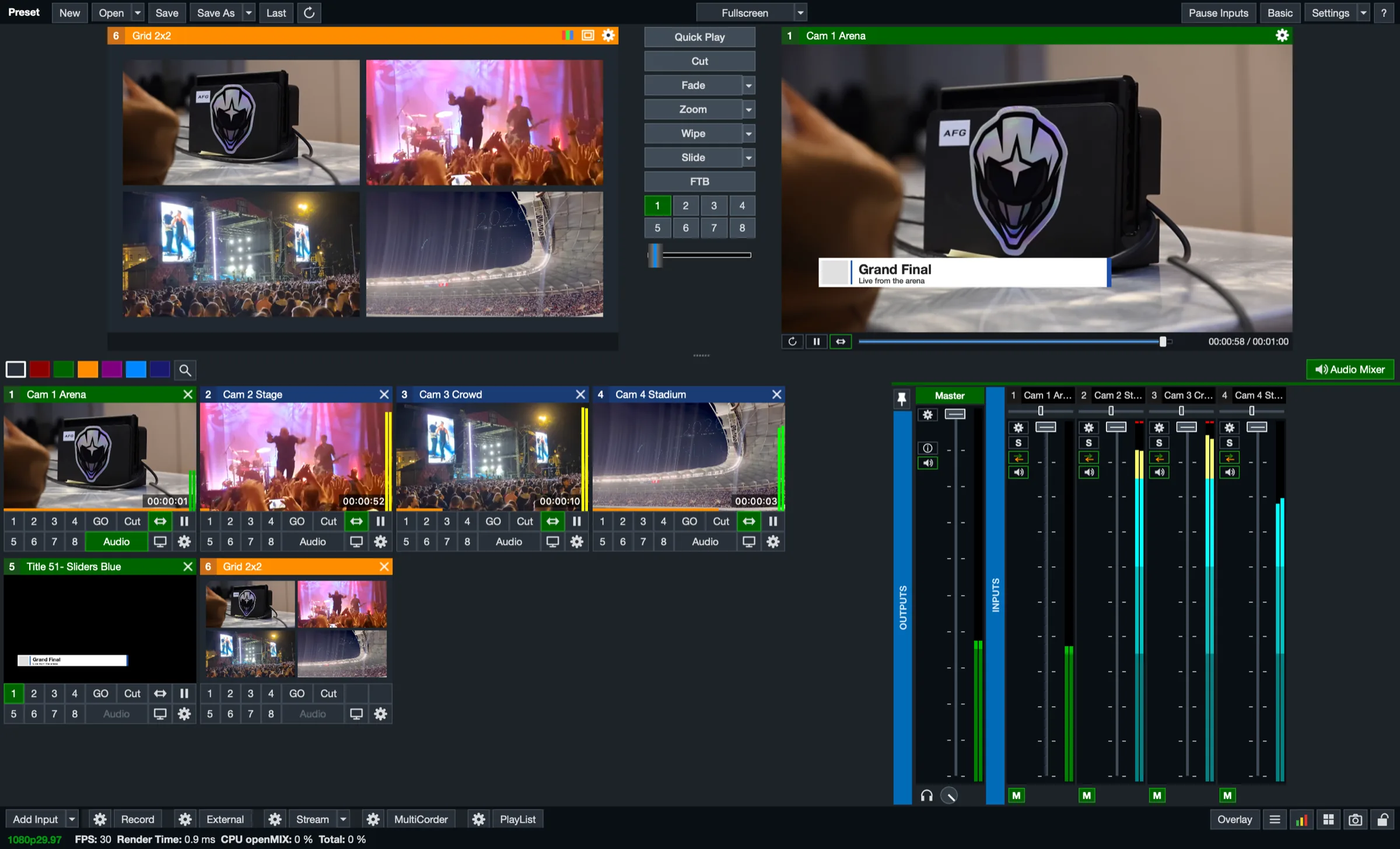
Главное окно в раскладке vMix: Preview, Program, входы и микшер. Пресеты, горячие клавиши и пульты работают по тем же именам функций.The main window in the vMix layout: Preview, Program, inputs and the mixer. Presets, shortcuts and controllers use the same function names.
УстановкаInstalling
macOS
- Откройте DMG и перетащите openMIX в папку «Программы».
- Запустите openMIX. Сборка пока не нотариализована Apple, поэтому macOS её остановит. Нажмите «Готово».
- Откройте «Системные настройки → Конфиденциальность и безопасность», внизу у сообщения об openMIX нажмите «Всё равно открыть» и подтвердите паролем или Touch ID.
- В окне активации введите ключ
OMIX-…и нажмите Activate. Нет ключа? Возьмите по ссылке в этом же окне или здесь. - Когда macOS спросит про камеру и микрофон, разрешите доступ.
- Open the DMG and drag openMIX to Applications.
- Launch openMIX. The build is not notarised by Apple yet, so macOS stops it — click Done.
- Open System Settings → Privacy & Security, click “Open Anyway” next to the openMIX message at the bottom and confirm with your password or Touch ID.
- In the activation window enter your
OMIX-…key and click Activate. No key? Use the link in that window or get one here. - When macOS asks about the camera and microphone, allow access.
Если кнопки «Всё равно открыть» нетIf there is no “Open Anyway” button
Снимите карантинную метку в Терминале:Remove the quarantine flag in Terminal:
xattr -dr com.apple.quarantine /Applications/openMIX.appWindows
- Скачайте
openMIX-1.0.39-windows-x64-setup.exeи запустите его. Сборка пока не подписана, поэтому SmartScreen покажет «Система Windows защитила ваш компьютер»: нажмите «Подробнее», затем «Выполнить в любом случае». - Установщик положит openMIX в Program Files, добавит ярлык в меню «Пуск» и удаление в «Параметры → Приложения».
- Без установки: распакуйте ZIP в любую папку и запустите
openMIX.exe. SmartScreen может спросить так же. - В окне активации введите ключ
OMIX-…и нажмите Activate. - Когда брандмауэр Windows спросит про доступ к сети, разрешите его: так заработают веб-контроллер, NDI и openMIX Call.
- Download
openMIX-1.0.39-windows-x64-setup.exeand run it. The build is not signed yet, so SmartScreen shows “Windows protected your PC”: click “More info”, then “Run anyway”. - The installer puts openMIX in Program Files, adds a Start menu shortcut and an uninstaller under Settings → Apps.
- Portable: unzip the ZIP anywhere and run
openMIX.exe. SmartScreen may ask the same way. - In the activation window enter your
OMIX-…key and click Activate. - When Windows Firewall asks about network access, allow it so the Web Controller, NDI and openMIX Call work.
Проверка файлаChecking the file
Хэш должен совпасть с SHA‑256 из карточки файла (значок ⓘ у кнопки скачивания):The hash must match the SHA-256 in the file’s card (the ⓘ beside the download button):
shasum -a 256 ~/Downloads/openMIX-1.0.39-macos-arm64.dmgНа Windows, в PowerShell:On Windows, in PowerShell:
Get-FileHash $HOME\Downloads\openMIX-1.0.39-windows-x64-setup.exeТребованияRequirements
| ПроцессорProcessor | Mac: Apple Silicon (M1 и новееor later); Windows: x64 |
|---|---|
| macOS | 26 Tahoe или новее26 Tahoe or later |
| Windows | 10 или 11, 64 бит; видеокарта с OpenGL 3.310 or 11, 64-bit; a graphics card with OpenGL 3.3 |
| Место на дискеDisk space | около 400 МБ на Mac и 600 МБ на Windows, плюс место под записиabout 400 MB on a Mac and 600 MB on Windows, plus room for recordings |
| ИнтернетInternet | для активации; дальше проверка раз в 6 часов, офлайн до 7 днейfor activation; then a check every 6 hours, offline for up to 7 days |
| Blackmagic DeckLink | драйвер Desktop Video от Blackmagic Design, версия 12 или новееthe Desktop Video driver from Blackmagic Design, version 12 or newer |
| NDI®, OMT, SRT | встроены, ставить ничего не нужноbuilt in, nothing to install |
| ПортыPorts | HTTP API 8088, TCP API 8099, openMIX Call 8089, OSC 9000; всё меняется в настройкахHTTP API 8088, TCP API 8099, openMIX Call 8089, OSC 9000, all configurable in Settings |